
Display products that are to be featured on the home page. The plug-in allows you to feature products per featured item type on pages you specify and with an additional option to show only featured items associated to a Category Page. This plug-in is typically used on the home page and sometimes on category pages.
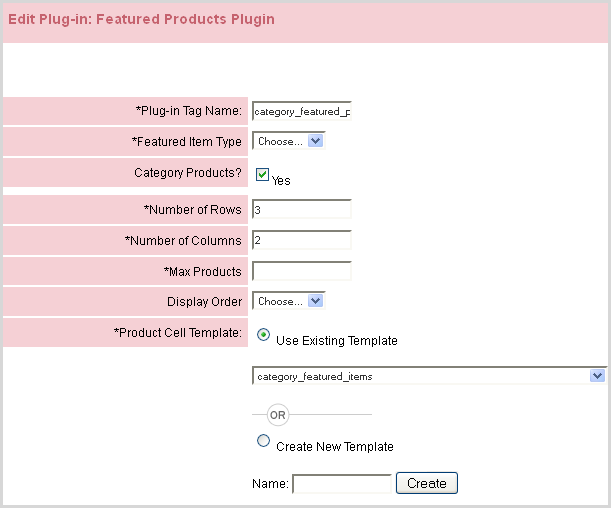
Follow the descriptions below to add the plug-in to a website.
|
Attribute |
Description |
|
Featured Item Type |
This selection is driven by the featured_item_types table where you can specify labels. Do not use category names.* |
|
Category Products |
Allows you to show featured items for specific categories. You associate categories through the product website channel editor.* |
|
Number of Rows |
Number of featured product rows to render. ** |
|
Number of Columns |
Number of featured product columns to render.** |
|
Max Products |
Enter in the result of Rows x Columns. |
|
Display Order |
Specify how the order of featured products should display. |
|
Product Cell Template |
You can configure the product cell template per each featured product output. |
|
Header Template |
You can configure the header template of the feature products plug-in. Keep in mind no footer template exists (needs to be added). |
|
Row Header Template |
You can configure a row header template of the feature products plug-in.*** |
Notes:
* You associate categories through the product website channel editor.
** Consider CSS to force width and height to control your rows and columns instead of tables. Don't forget to use CSS overflows where needed.
*** This template is not needed, if you are using CSS to force size of the product cell (See Note **) for outputing your product cells.
© 2023 CORESense · info@coresense.com · 125 High Rock Avenue, Saratoga Springs, NY 12866