
This functionality enables you to deploy re-marketing campaigns to customers who have added items to their shopping cart but did not complete their purchase. The plug-in sends all Email Campaign Conversion Tracking Codes and Cart Abandonment Codes to Listrak. The integration involves placing code snippets on your site to identify customers and send data, like their email address and cart contents, to Listrak for email marketing campaigns.
Follow the steps below to add the plug-in to a website.
|
Step |
Action |
|
1 |
Establish an account with Listrack. |
|
2 |
Click the (+) to expand the Listrak section. |
|
3 |
From the plug-in window, select Listrak Plug-in. |
|
4 |
Enter XYZ as the plug-in name and select the checkbox to make this active. |
|
5 |
Preview and publish your website to enable the Listrak conversion code on your live website. |
Note: If you have any questions about this plug-in or how to implement it beyond the information provided here, contact CORESense Customer Support.
Customer Purchase Metrics enables you to build stronger relationships with customers that are purchasing from your website. The integration process involves placing code snippets on your site to track visitors arriving at your site from email campaigns. Additionally, code on the order confirmation page will send basic order data to Listrak for processing and analysis.
The Metrics integration includes four Listrak feeds: Order Export, Order Item Export, Customer Export, and Product Export. Guidelines for how the feeds operate are:
Contact CORESense Customer Support to request this implementation.
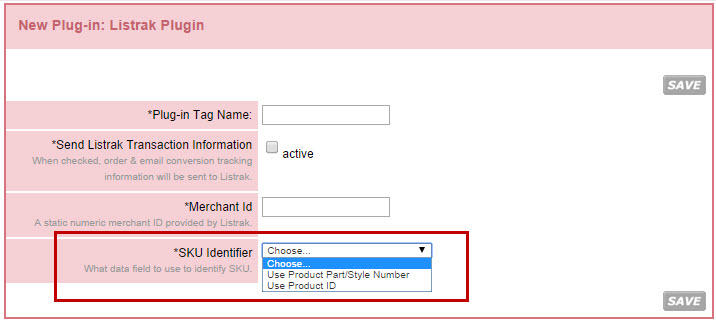
There is an option to the Listrak plug-in that allows users to choose what field they want to use as the "SKU Identifier". The options are:
© 2023 CORESense · info@coresense.com · 125 High Rock Avenue, Saratoga Springs, NY 12866