
This plug-in is used to define functions available within a web site shopping cart.
The Persistent Shopping Cart function allows customers to be able to begin shopping with a copy of their shopping cart from their last website visit (Persistent Cart).The plug-in includes the following Persistent Shopping Cart features:
Enable Persistent Cart field in the plug-in to control the activation of this feature with a “yes” or “no” option.
Length of Cart Retention: a configurable setting allows retailers to specify the number of hours that a cart is retained. If set to ' 0' then carts will not be kept for customers who are not logged in.
The inventory reservation functionality is managed by the settings for the website, so after that period, no inventory is kept against the persistent cart items.
On customer log-out, the shopping cart (if populated with products) saves to the customer account.
On customer log-in, you can choose a setting to either have a customer be directed to the shopping cart or to the My Account area.
All products that are in stock are added to the cart in the current shopping session.
After an order is completed, the shopping cart is cleared.
Static content can be added to code to include messaging specific to when a cart item is no longer in stock.
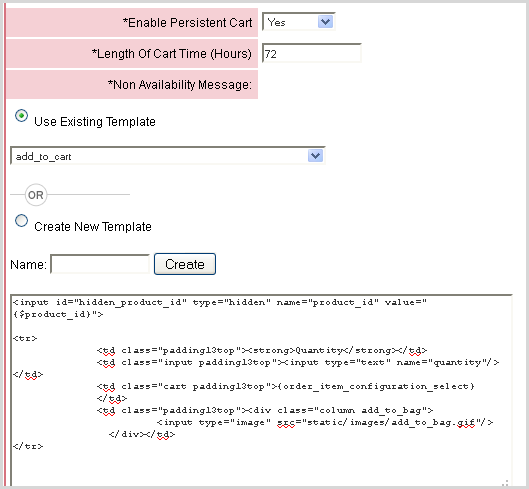
There is the ability to manage Ship-To information of each order item in the Shopping Cart. This functionality is organized as follows.
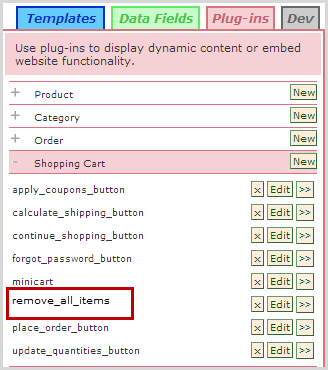
The shopping cart page can include the ability to remove all items from the shopping cart. By adding a checkout button plug-in, that when clicked, deletes all items from the shopping cart. In the template 'shopping_cart-footer' add the newly created plug-in, then Preview/Publish the change and add items to cart.
© 2023 CORESense · info@coresense.com · 125 High Rock Avenue, Saratoga Springs, NY 12866