
Reports can be accessed from the Menu button for daily information of sales.
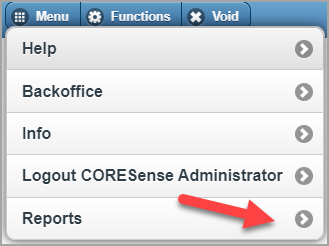
The End of Day process consists of closing the register and running multiple reports for accounting to print or reprint at anytime. These reports are used to verify the expected cash drop against the actual cash.
Note: When you close the register that is the action that clears the register's daily data. The information is then itemized within the Z-Out Register report.
The POS reports available in CORESense are described in the table below.
|
Report |
Description |
| Cashier Detail | Displays the drawer count at open and at closed. |
|
Daily Transactions |
This report displays similar information as the X-Out Store but includes the line item detail for returns and drawer adjustments. |
|
Deposit |
The deposit report displays payment information for a specific date range. |
|
Merchandise Hierarchy |
Each product is connected to a merchandise department, class and sub-class. This report presents sales data for each product sold broken out by department. |
|
Orders |
The Orders Report summarizes all the orders transacted on a specific POS. |
|
SKU Activity |
List of SKUs sold and returned for the selected date range. |
|
X-Out Register |
This report provides the same information as the Z-Out report but it is real time information for sales and is specific to a POS. Viewing/Printing this information has no effect on the end-of-day process. It is for informational purposes only.
|
|
X-Out Store |
The X-Out Store is sales data based on all the registers assigned to the location hierarchy. This report does not contain line item detail for drawer adjustments or returns. |
|
Z-Out |
The Z-Out report tracks all sales data on a single register for all work shifts and verifies the cash and other method of payments are balanced against the transactions. This report clears out the data for that register and is run at day's end. |
Note: With integrated credit card processing, the X-out report always matches the batch which would match the physical credit card receipts. This is an automated process so no manual reconciliation is required. As a best practice measure, you can use the Payments report to reconcile with the payment gateway after the fact.
© 2023 CORESense · info@coresense.com · 125 High Rock Avenue, Saratoga Springs, NY 12866