
Datamart reporting is fee-based service that requires additional configuration to the Back Office. Contact Customer Support to submit a request for Datamart information. These financial reports use data drawn from the Accounting Summary table, which reflects shipped orders (orders that are assigned a ship date), for the purpose of accounting. The advantage in using Datamart lies in its flexibility in creating custom reports. The basic features include the following elements:
Reporting is run on separate server
Cron runs nightly to update inventory changed and transactional information.
Over twenty editable report templates
Reporting fields vary based on cube selected
Inventory history reporting
Sell Throughs
Period over period
Transfer activity tracking
Report generation alert
Stores reports, tracks status, locks access
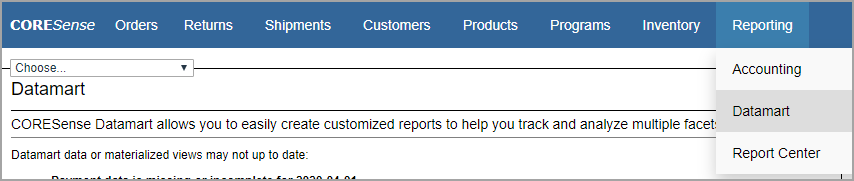
Datamart implementation requires several preliminary steps before it fully functional.
Request implementation via Customer Portal and the Professional Services team will contact you regarding contract requirements.
CORESense hosting team will initiates activation of the functionality so the client can perform data cleanup tasks.
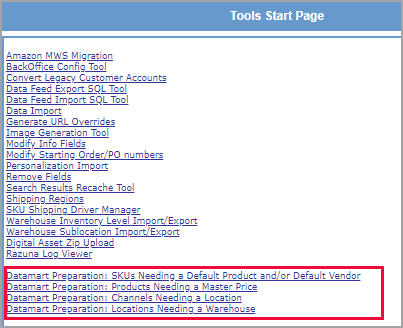
Perform data cleanup tasks. Go to the System Settings > Tools and run the list of Datamart Preparation clean up links:
SKUs that are missing a default product and/or vendor. This can be corrected in the Inventory Manager. Even if there is only one product associated with the SKU, the Product needs to be selected in order for Datamart to report on it.
Products that are missing a master price, corrected in the Product > Pricing tab.
Channels that are missing an assigned location, this can be done from the Products tab > Sales Channel Manager.
Locations that are missing a warehouse assignment, this can be corrected from the System Admin > Location Hierarchy Manager.
4. Once the cleanup is complete, a request is submitted to CORESense hosting to fully activate Datamart so that data can start accumulating.
5. Training is scheduled to walk through report creation process.
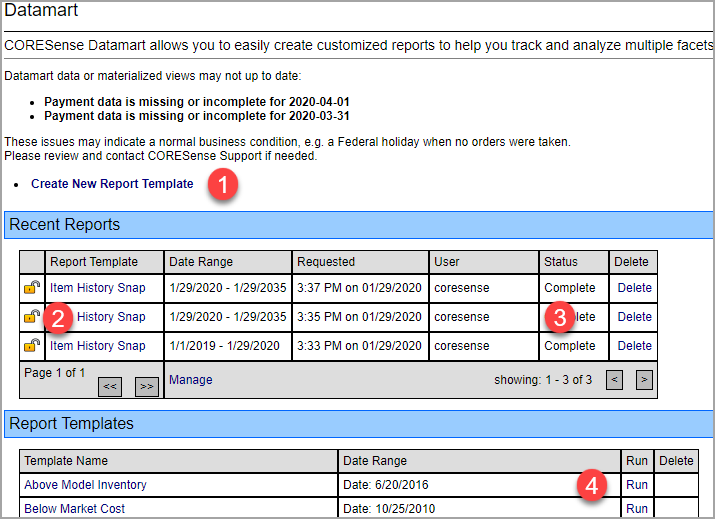
Below is an image of the Datamart main screen.
Click on link to initiate a new custom report.
Click on lock icon to unlock recently generated reports.
Review recently run reports and track generated report statuses.
Run or edit sample report templates.
There some permissions that can be assigned to users to manage access to locking and unlocking of orders.
Order Manager - Lock Order
Order Manager - Unlock Order
© 2023 CORESense · info@coresense.com · 125 High Rock Avenue, Saratoga Springs, NY 12866