
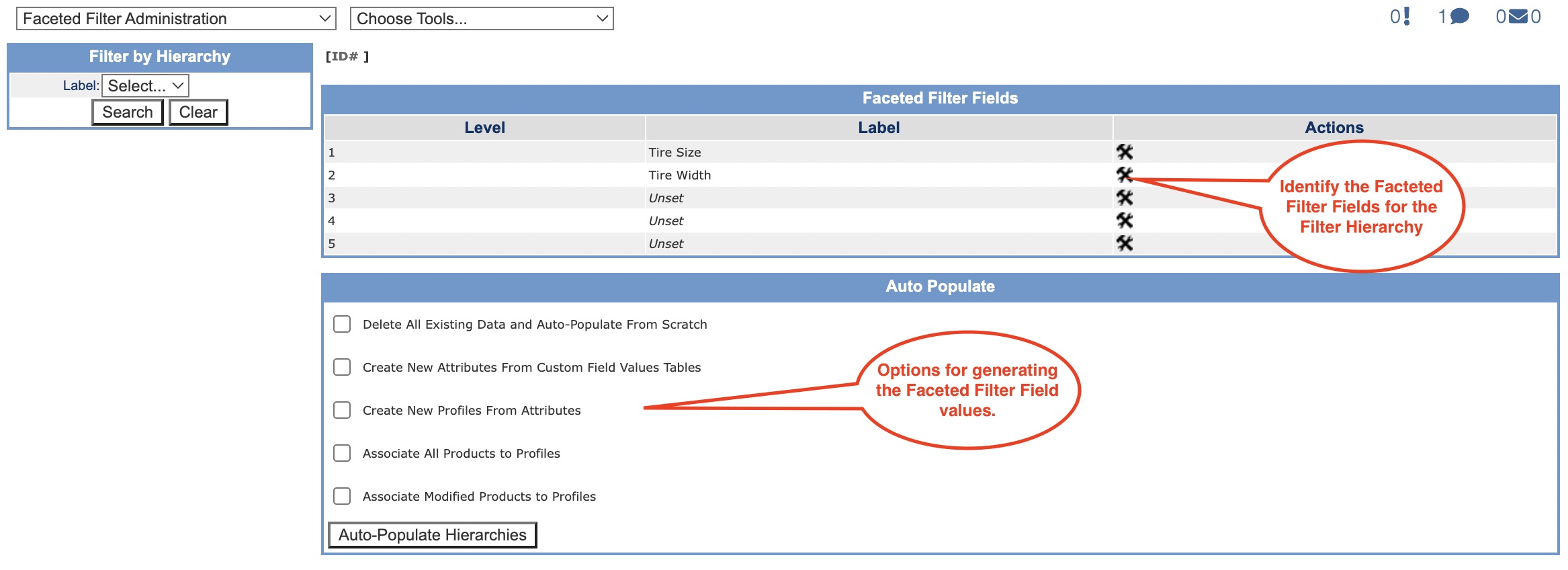
The Faceted Filter Administration screen displays your product type attributes that will be used to build your profile hierarchy. These attribute values are maintained in the Technical Configuration value tables individually view sample . In the Auto Populate box there are generation options as described in the table below. Check the appropriate box(es) based on what you need to populate.
|
Option |
Purpose |
|
Delete All Existing Data and Auto-Populate From Scratch |
Use this the first time you are populating your hierarchy attribute values. |
|
Create New Attributes From Custom Field Values Tables |
Select this option if you have made any changes to your product type attributes. When run, it pulls in any new attributes so that they are available for faceted filter profiles. |
|
Create New Profiles From Attributes |
Select this option to generate new profiles based upon changes made to your product type attributes. |
|
Associate All Products to Profiles |
Select this option to assign all products with the identified product attributes to your faceted filter profiles. |
|
Associate Modified Products to Profiles |
Select this option to assign only modified products with the identified product attributes to your faceted filter profiles. |
© 2023 CORESense · info@coresense.com · 125 High Rock Avenue, Saratoga Springs, NY 12866