
Tracking your purchases is an important step in maintaining your inventory. By knowing what you have on order, how many and when it will be received, you can keep your inventory at an optimum level. CORESense can help you create purchase orders for the appropriate items and quantities, and help track just-in-time (JIT) and drop ship orders as well.
Create purchase orders to get items and materials you need for replenishing stock and selling to customers. By entering a purchase order, you initiate the purchase and record all aspects of the purchase:
Knowing this information about your purchases helps you keep your stock streamlined.
For example, your item ABC sells at an average rate of 1 unit per month. You have one unit in stock and wonder if you need to order more now. When you track your purchase orders, you can check the quantity on order and see that you already placed an order for three units of item ABC. Because this is an average three-month supply, you do not need to place another order now.
CORESense provides the ability set Purchase Order General Attributes default values by Vendor or Globally.
To set them by Vendor go to Inventory Manager > Vendor Manager > Vendor record > Purchasing.
To set them Globally (for all Vendors) go to Systems Settings>Purchasing.
To set them by Vendor Manager go to the Vendor Manager. Vendor settings override Global settings.
You can create purchase orders manually using the Purchase Order Builder, Inventory Manager or during import of new products and skus.
You can also have purchase orders created automatically for:
Reordering automation create purchase orders for items that are needed based on preset reorder points and quantities. Reordering is ideal because it takes the guesswork out of how much you need and when to order it.
The table below describes how each of the managers is used for grid and non-grid setups.
|
Manager |
Grid |
Non-Grid |
Description |
|
Purchase Order Builder |
X |
X |
|
|
Purchase Order Manager |
X |
X |
|
|
Purchase Order Queue |
X |
X |
|
|
Inventory Manager |
X1 |
X |
|
1Grid products can be purchase in the Inventory Manager just not in a grid or matrix format.
Stock, Drop-ship and Just-in-time Purchase Orders
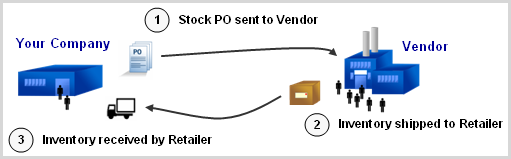
CORESense provides three types of purchase orders. These include Stock, Drop-ship and Just-in-time Purchase Orders, where each type corresponds to a fulfillment method available in CORESense. For more information on fulfillment methods, see Inventory Fulfillment Methods.
Used for replenishing stock inventory in your warehouse(s). Inventory can be purchased from vendors using purchasing level discounts, case sizes and incentives.
Inventory received from the purchase order is first assigned to orders containing backordered inventory (from oldest to newest) before In Stock inventory levels are increased.
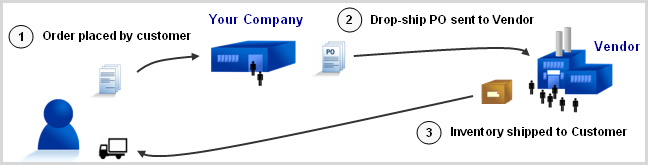
Drop-ship Purchase Order
Used for purchasing inventory shipped directly from the vendor to your customer. Drop-ship purchase orders are typically sent directly from the customer's order in CORESense.
Shipments are generated when the PO is created.
Once the vendor ships the inventory, you may be notified with a confirmation including the tracking number based upon your agreement with the vendor.
Once notified, you can complete the process by updating the customer's ship date and tracking number to the shipment, which sends a shipment confirmation email.
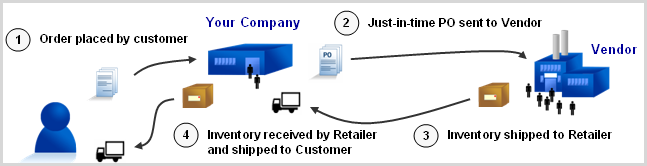
Just-in-time Purchase Order
Used for purchasing inventory from the vendor for a customer's order, where inventory is shipped from the vendor to your warehouse, then from your warehouse to the customer.
Just-in-time purchase orders can contain inventory for a single customer's order or multiple customer orders.
Inventory received from the purchase order is assigned to orders for which the inventory was originally purchased (from oldest to newest).
Shipments are created once the you receive the inventory.
NOTE: JIT (Just in Time) POs are filtered into a single PO if the vendor, warehouse, PO delivery method (email or fax) and shipping method all match.
© 2023 CORESense · info@coresense.com · 125 High Rock Avenue, Saratoga Springs, NY 12866